
The Problem
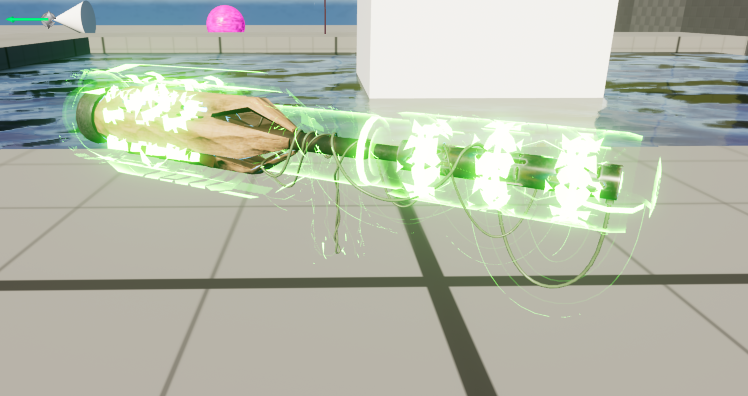
Items in the world blended into the environment and needed to visually communicate to the player that they could be interacted with and their rarity through a glow effect similar to games like Borderlands or Diablo. This decision fit the lore of Beyond Human because the player is a genetically altered being, seeing the glow through their artificially enhanced eye sight. The implementation of this needed to be:
1. Artist friendly - configured in the editor, not in code
2. Multiplayer safe - visible to all players in SP, MP or Co-op
3. Performance Optimized - no unnecessary data sent over the network
4. Maintainable - clean and scalable
The Solution
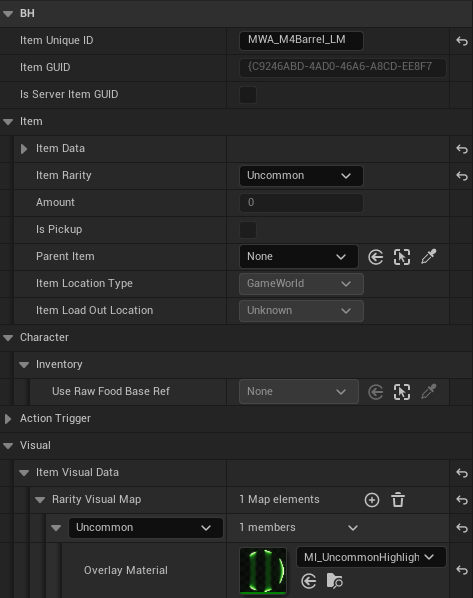
Rarity is defined as an Enum with five tiers Uncommon, Common, Rare, Epic and Legendary. Rarity and the pickup item's visual data are edited directly through the item's respective Blueprint in the editor, making it artist and designer friendly. The glow is only applied to the world pickup static mesh and is removed when picked up because then the skeletal mesh is used when equipped. Conversley, the effect is reapplied if the item is dropped back into the world from the player's inventory. Rarity replicates as a single uint8 using a RepNotify to trigger the effect on each client when it is recieved. This ensures that all players see the correct glow simultaneously, while keeping the network overhead low. Each rarity maps to a struct holding a material reference stored within a TMap. This replaced a TArray that had been previously implemented, reducing the lookups to a single call and eliminating the possibility of duplicate or missing rarity entries.
Technical Challenges
TMap Replication:
Unreal Engine does not support TMaps in replicated structs. To avoid this conflict, I removed the visual data from the item data that was being replicated, keeping it strictly with the pickup actor. This also helped to cleanly seperate cosmetic data from gameplay data.
Nanite Incompatibility:
The nanite renderer does not support overlay materials. I ran into an issue where I wasn't seeing the glow effect appear at all after implementation. This was resolved by disabling nanite on the pickup item meshes.
Editor Preview:
BeginPlay was insufficient for previewing the effect because the designer would have to playtest with PIE each time they wanted to see the effect take place. Adding OnConstruction helped to get the glow to update in the viewport, removing the need to constantly PIE to preview the changes made by the designer or artist.
Key Takeaways
1. An artist driven workflow without hardcoded colors or material references helps streamline the setup process for other team members.
2. Best practices with object pointers, correct use of constants and TMaps instead of manual TArray lookups keeps performance optimal.
3. A clean seperation between gameplay data and visual data helps to maintain the network replication footprint.